Manually Connecting to a Host
Perform the following steps to manually connect to a host:
- Do one of the following:
- Click the Connect button on the SANsurfer iSCSI HBA Manager main window toolbar.
- On the SANsurfer iSCSI HBA Manager main window Host menu, click Connect.
- Press INSERT.
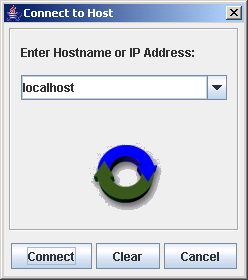
The Connect to Host dialog box displays (see the illustration below).
Connect to Host Dialog Box
- In the Enter Hostname or IP Address box, do one of the following:
- Select localhost to connect to the machine on which you are using the SANsurfer iSCSI HBA Manager GUI.
- Type or select a remote machine. You can use the host name or the machine's IP address.
- Do one of the following:
- Click Connect to initiate the connection. If successful, the host and its HBAs display in the HBA tree. If you entered a new remote host and the connection was successful, its name is also added to the Enter Hostname or IP Address box drop-down list.
- Click Cancel to abort the connection process and return to the SANsurfer application GUI.
- Click Clear to delete all machines on the list except localhost. (The local machine cannot be deleted.)