Uninstalling the SANsurfer Application — Step 3
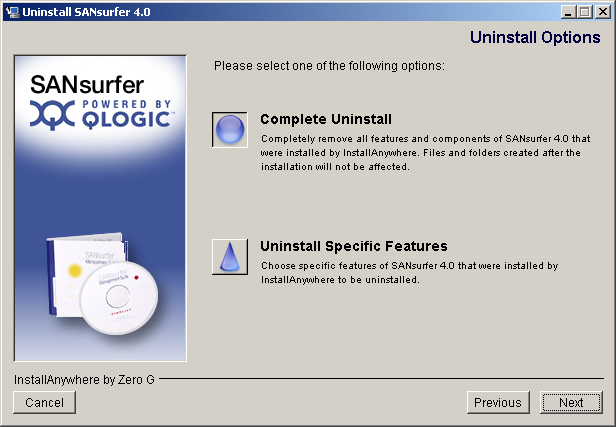
- The Uninstall Options dialog box displays (see the illustration below).
Uninstall Options Dialog Box
You can uninstall the entire SANsurfer application or specific features. Do one of the following:
- Select Complete Uninstall to remove all features and components of the SANSurfer application that were installed by InstallAnywhere. This will not affect files and folders created after the installation.
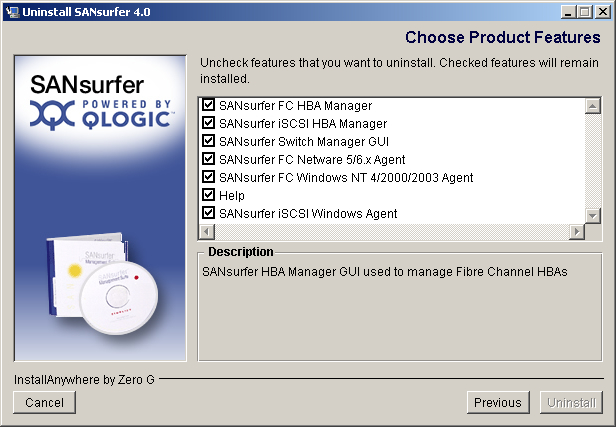
- Select Uninstall Specific Features to remove specific features of the SANSurfer application that were installed by InstallAnywhere. The Choose Product Components dialog box displays (see the illustration below). The dialog box differs, depending on whether you are installing on a Windows 2000/Windows Server 2003, Red Hat/SuSE Linux, or Solaris SPARC/x86 system.
Choose Product Features Dialog Box (Sample)
- Clear the check boxes of features that you want to uninstall. (Check boxes that are selected remain installed). Select from the following components (all components may not display and the order of the components may vary):
For a Windows 2000/Windows Server 2003 system:
- SANsurfer FC HBA Manager
- SANsurfer iSCSI HBA Manager
- SANsurfer Switch Manager GUI
- SANsurfer FC NetWare 5/6.x Agent
- SANsurfer FC Windows NT 4/2000/2003 Agent
- SANsurfer iSCSI Windows Agent
- Help
For a Red Hat/SuSE Linux system:
- SANsurfer FC HBA Manager
- SANsurfer iSCSI HBA Manager
- SANsurfer Switch Manager GUI
- SANsurfer FC Linux Agent
- SANsurfer iSCSI Linux Agent
- Help
For a Solaris SPARC/x86 system:
- SANsurfer FC HBA Manager
- SANsurfer iSCSI HBA Manager
- SANsurfer Switch Manager GUI
- SANsurfer FC Solaris Agent
- SANsurfer iSCSI Solaris Agent
- Help
- Click Uninstall.


 Go to Step 2