Viewing the Connection Error Log
The connection error log displays the 100 latest connection errors for this HBA port.
Perform the following steps to view the connection error log:
- In the SANsurfer iSCSI HBA Manager main window HBA tree, select the HBA port.
- Click the Diagnostics tab, and then click the Logs tab. The Diagnostics tabbed page (Logs tab) displays (see the illustration below).
Diagnostics Tabbed Page (Log Tab)
The HBA port identifying information displays:
- HBA. HBA instance number and HBA model
- State. The HBA port state. See Monitoring the HBA Port State for details about the HBA port state and its correspondence with the HBA icons.
- Green background: good
- Yellow background: warning
- Blue background: unknown
- Red background: bad
- HBA iSCSI Name. HBA port iSCSI name. The QLogic manufacturing default name or a name that you assign.
- HBA Alias Name. HBA port iSCSI alias name. Symbolic name you assign to the HBA port for identification purposes.
- IP Address. IP address of the HBA port
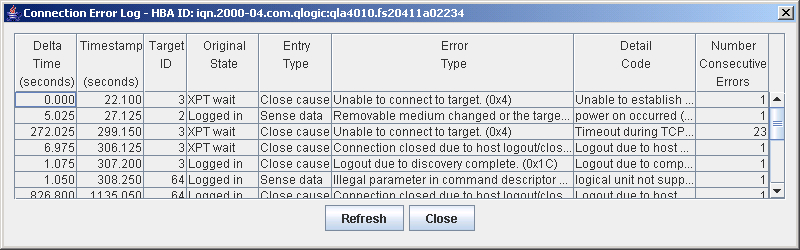
- On the Logs tab click Display Connection Errors. The connection error log displays (see the illustration below).
Connection Error Log
For the HBA port that you selected, the connection error log displays the following information. To view an entire entry, place the cursor on it. For detailed information, see the ISP4010 Firmware Interface Specification (see Related Documents).
- Delta Time. The number of seconds between the current timestamp and the previous timestamp
- Timestamp. The time of the most current HBA reset
- Target ID. Device ID of the device as defined by the QLogic software
- Original State. The state of the HBA and target connection
- Entry Type. For the original state, the error or information category
- Error Type. For the entry type, the error or sense message and its hex value
- Detail Code. For the error type, the detailed error or sense information with its hex value
- Number of Consecutive Errors. Number of times this detail code has occurred consecutively
- If you want to refresh the log information immediately, click Refresh.
- To exit the log, do one of the following:
- Click Close.
- Click the Close (x) button in the upper right-hand corner of the screen.