Configuring Targets
After configuring the QLA4xxx HBA, you can configure iSCSI targets. When the QLA4xxx HBA arrives from the factory, there are no targets listed. Add iSCSI targets by either entering specific iSCSI target information (IP address and iSCSI name, see Configuring Specific Targets) or by entering the target IP address and discovering the devices behind that address (see Configuring Targets Using Discovery).
Perform the following steps to configure targets:
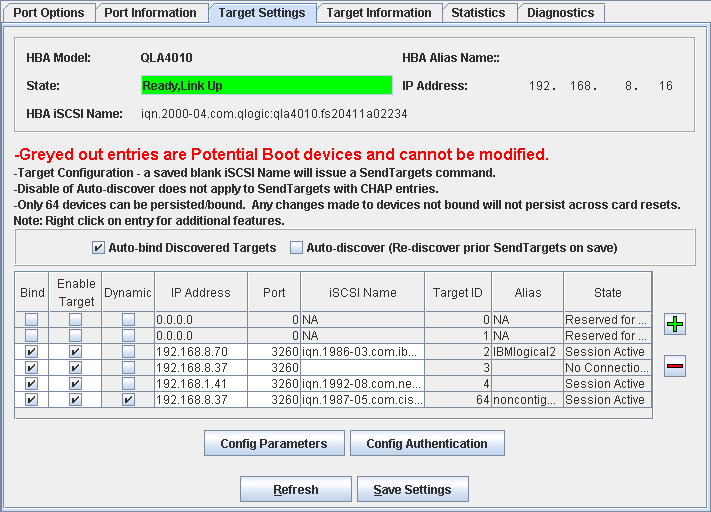
- In the SANsurfer iSCSI HBA Manager main window HBA tree, select the HBA port. Click the Target Settings tab. The Target Settings tabbed page displays (see the illustration below).
Target Settings Tabbed Page
The HBA port identifying information displays:
- HBA. HBA instance number and HBA model
- State. The HBA port state. See Monitoring the HBA Port State for details about the HBA port state and its correspondence with the HBA icons.
- Green background: good
- Yellow background: warning
- Blue background: unknown
- Red background: bad
- HBA iSCSI Name. HBA port iSCSI name. The QLogic manufacturing default name or a name that you assign.
- HBA Alias Name. HBA port iSCSI alias name. Symbolic name you assign to the HBA port for identification purposes.
- IP Address. IP address of the HBA port
The target configuration section displays the current target configuration and enables you to configure these and additional targets on this HBA port.
- Bind. Whether the specific target is bound to the HBA port. Targets for which the Bind check box is not selected will not persist across save operations unless they are rediscovered using one of the target discovery methods.
- Enable Target. Whether the target is enabled
- Dynamic. Whether target configuration is dynamic or saved into flash memory. This is a read-only field.
- IP Address. IP address of the target
- Port. Port ID for iSCSI devices as defined by the iSCSI standard
- iSCSI Name. Target iSCSI name as defined by the iSCSI standard
- Target ID. Target ID of this device as assigned by QLogic software
- Alias. Target iSCSI alias name as defined by the manufacturer software
- State. The target session connection state. See Monitoring the Target State for details about the target state and its correspondence with the device icons.
- Green background: good
- Blue background: unknown
- Red background: bad
- Configure the targets as described in the following sections: