Changing the Target Configuration Parameters
NOTE: If you changed HBA's firmware configuration parameter values (see Configuring an HBA's Firmware Values, Restoring an HBA's Firmwware Parameters to the Factory Defaults, and Upgrading an HBA with new Firmware), a subset of those settings appear for the corresponding target configuration parameters. Changing the target configuration parameters will not change the corresponding HBA's firmware configuration parameters.
Perform the following steps to edit the target configuration parameters:
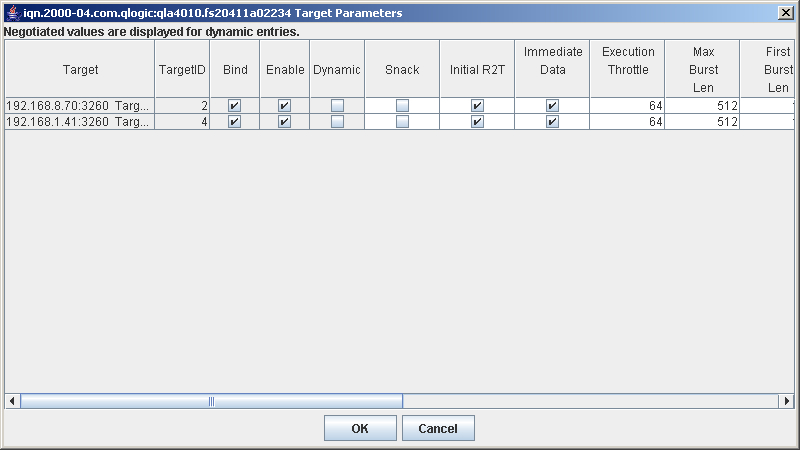
- In the SANsurfer iSCSI HBA Manager main window HBA tree, select the HBA port. Click the Target Settings tab, and then click Config Parameters. The Target Configuration Parameters dialog box displays (see the illustration below).
Target Configuration Parameters Dialog Box
Note the following about Target Configuration Parameters dialog box:
- All targets that display on the Target Settings tabbed page (see Configuring Targets) display here. These include targets that are saved, discovered, newly added, and discovered through iSNS.
- For dynamic targets (discovered using SLP or the SendTargets command), the values that display are the negotiated values unless these values were modified using the Target Configuration Parameters dialog box.
- For non-dynamic targets, the values that display are the default values from the saved HBA configured firmware default settings at the time they were added or the values last configured using this dialog box.
For example, if you add targets, update the HBA's firmware configuration parameter values and save them (see Configuring an HBAs Firmware Values), and then add additional targets, the additional targets will have the new saved HBA configured firmware default settings. The first set of added targets will have the original HBA's configured firmware default settings that existed when they were added.
- Select and change the desired parameters. Except for the following parameters, they are a subset of the firmware configuration parameters. (For descriptions of the firmware configuration parameters, see Configuring an HBAs Firmware Values.)
- Bind. When the check box is selected in this read-only field, the target is bound to the QLA4xxx HBA.
- Enable. When the check box is selected in this read-only field, the target is visible and accessible to the QLA4xxx HBA. When this check box is not selected, the target is visible, but not accessible, to the QLA4xxx HBA.
- Dynamic. When the check box is selected in this read-only field, the target has been identified, but is not yet visible or accessible to the QLA4xxx HBA.
- Default Timeout. This column indicates the timeout interval that the QLA4xxx HBA firmware uses for timing out commands or PDUs created and transmitted by the QLA4xxx HBA that are not related to an IOCB. For example, in session mode the firmware generates Login Command and Text Command PDUs. These PDUs are not related to an IOCB; therefore, they have no inherent timeout value. In this case, the firmware uses the value specified in this column as the timeout interval for the Login Command and Text Command PDUs. The firmware also uses the timeout interval specified in this field for timing out Task Management commands that are generated by the firmware as part of error recovery or in response to a mailbox command that results in a Task Management command. The default value for this column is 10 seconds. Valid values are in the range 0-65535.
- When you are done changing the parameters, click OK. A message displays indicating that these changes will be saved when you click Save on the Target Settings tabbed page. Click OK.